Community Forum Closure Announcement
This forum is now Read-Only. The Magento Community Forum is scheduled to close permanently on December 31, 2025. Please save any necessary information before this date. Join us on Slack for continued engagement!
- Forums
- :
- Core Technology - Magento 2
- :
- Magento 2.x Programming Questions
- :
- Re: How to change position of the sidebar block on...
Options
- Subscribe to RSS Feed
- Mark Topic as New
- Mark Topic as Read
- Float this Topic for Current User
- Bookmark
- Subscribe
- Printer Friendly Page
Turn on suggestions
Auto-suggest helps you quickly narrow down your search results by suggesting possible matches as you type.
Showing results for
How to change position of the sidebar block on CMS Pages?
SOLVED
- Mark as New
- Bookmark
- Subscribe
- Subscribe to RSS Feed
- Permalink
- Report Inappropriate Content
12-27-2018
07:18 AM
12-27-2018
07:18 AM
Hello,
I used widget on Admin backend to create a sidebar block on all CMS pages. Here is the block codes
<meta name="viewport" content="width=device-width, initial-scale=1" />
<style xml="space"><!--
body {
font-family: "Lato", sans-serif;
}
.sidenav {
width: 200px;
position: relative;
z-index: 1;
top: 0;
left: 0;
background-color: #fff;
overflow-x: hidden;
padding-top: 20px;
}
.sidenav a {
padding: 10px 10px 10px 10px;
text-decoration: none;
font-size: 15px;
color: #818181;
display: block;
}
.sidenav a:hover {
background-color: #f1f1f1;
}
@media screen and (max-height: 450px) {
.sidenav {padding-top: 15px;}
.sidenav a {font-size: 18px;}
}
--></style>
<div class="sidenav">
<a href="/about-us">About Us</a>
<a href="/privacy-policy">Privacy Policy</a>
<a href="/terms-and-conditions">Terms & Conditions</a>
<a href="/shipping-and-delivery">Shipping & Delivery</a>
<a href="/returns-and-exchanges">Returns & Exchanges</a>
<a href="/payment-methods">Payment Methods</a>
<a href="/measuring-guide">Measuring Guide</a>
<a href="/size-chart">Size Chart</a>
<a href="/color-chart">Color Chart</a>
<a href="/faqs">FAQs</a>
</div>All the pages were set to 2 columns with left bar layout. I cleared the cache and refreshed the page. I found the sidebar is very close to the left. Can you please tell me how to move the sidebar to the correct position. Thank you in advance. I am using magento 2.27 version and a 3rd-party template.
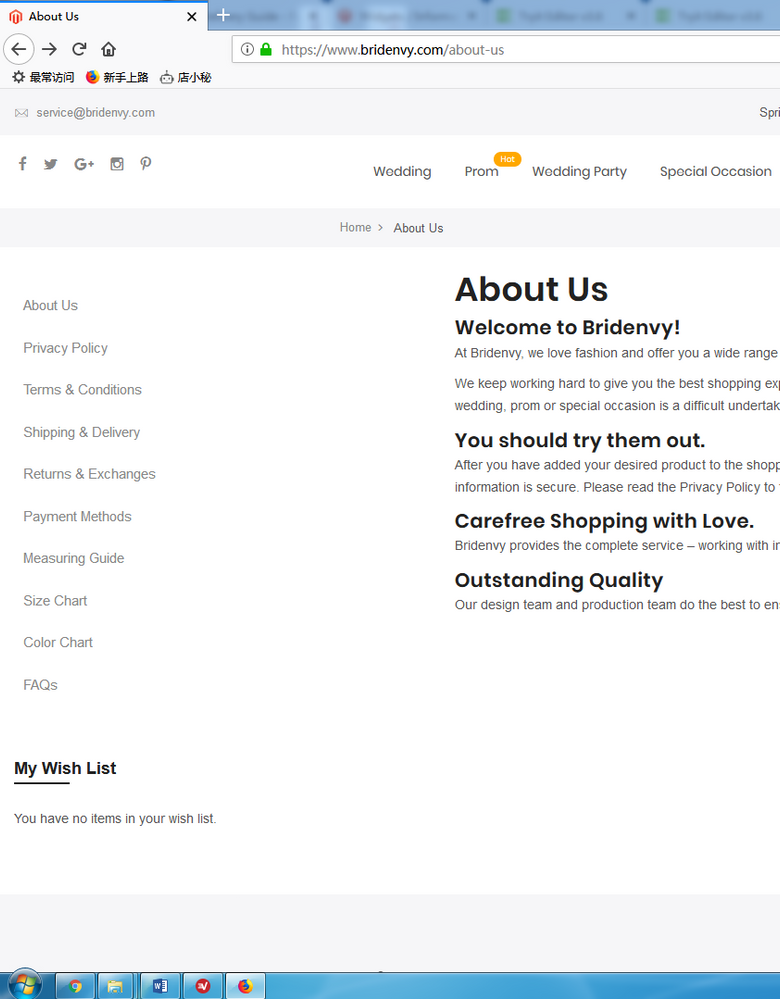
Solved! Go to Solution.
Labels:
1 ACCEPTED SOLUTION
Accepted Solutions

- Mark as New
- Bookmark
- Subscribe
- Subscribe to RSS Feed
- Permalink
- Report Inappropriate Content
01-02-2019
08:19 PM
01-02-2019
08:19 PM
@ruvaders wrote:Hello,
I used widget on Admin backend to create a sidebar block on all CMS pages. Here is the block codes
<meta name="viewport" content="width=device-width, initial-scale=1" /> <style xml="space"><!-- body { font-family: "Lato", sans-serif; } .sidenav { width: 200px; position: relative; z-index: 1; top: 0; left: 0; background-color: #fff; overflow-x: hidden; padding-top: 20px; } .sidenav a { padding: 10px 10px 10px 10px; text-decoration: none; font-size: 15px; color: #818181; display: block; } .sidenav a:hover { background-color: #f1f1f1; } @media screen and (max-height: 450px) { .sidenav {padding-top: 15px;} .sidenav a {font-size: 18px;} } --></style>
<div class="sidenav"> <a href="/about-us">About Us</a> <a href="/privacy-policy">Privacy Policy</a> <a href="/terms-and-conditions">Terms & Conditions</a> <a href="/shipping-and-delivery">Shipping & Delivery</a> <a href="/returns-and-exchanges">Returns & Exchanges</a> <a href="/payment-methods">Payment Methods</a> <a href="/measuring-guide">Measuring Guide</a> <a href="/size-chart">Size Chart</a> <a href="/color-chart">Color Chart</a> <a href="/faqs">FAQs</a> </div>All the pages were set to 2 columns with left bar layout. I cleared the cache and refreshed the page. I found the sidebar is very close to the left. Can you please tell me how to move the sidebar to the correct position. Thank you in advance. I am using magento 2.27 version and a 3rd-party template.
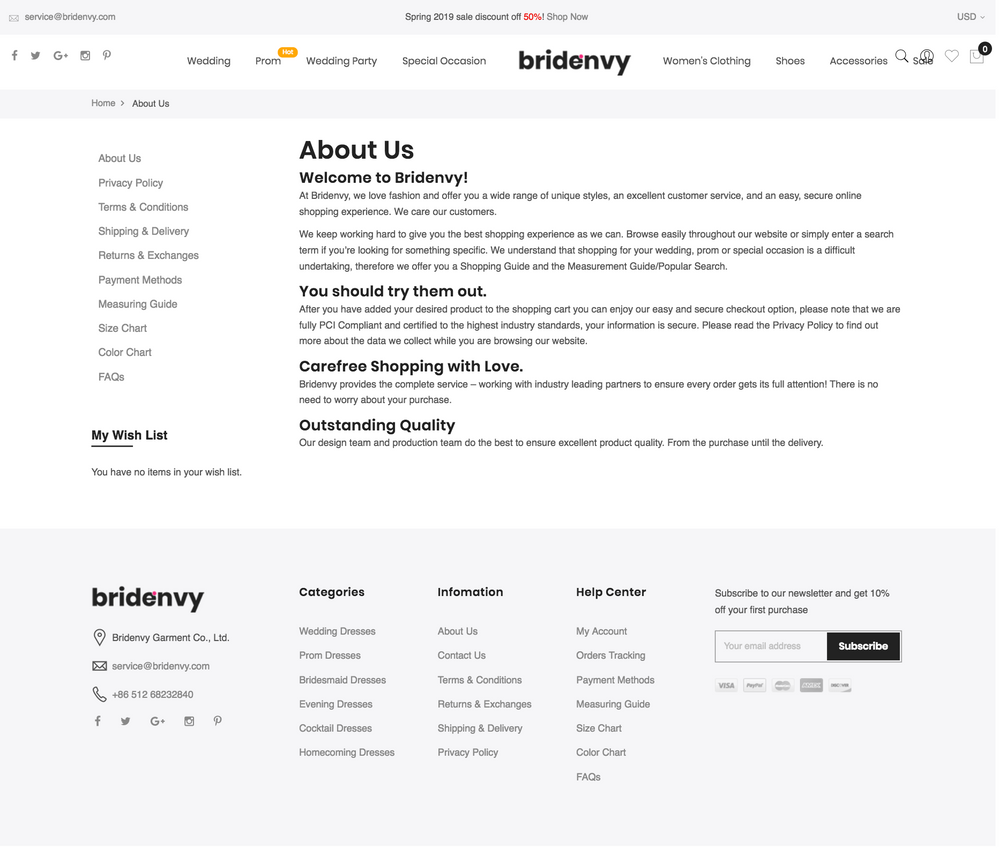
This is the Css Issue,
Use this code
@media (min-width: 1200px)
{
body.wide .container
{
width: 1200px !important;
}

Reply
2 REPLIES 2
- Mark as New
- Bookmark
- Subscribe
- Subscribe to RSS Feed
- Permalink
- Report Inappropriate Content
01-02-2019
08:17 PM
01-02-2019
08:17 PM
Re: How to change position of the sidebar block on CMS Pages?
@ruvaders wrote:Hello,
I used widget on Admin backend to create a sidebar block on all CMS pages. Here is the block codes
<meta name="viewport" content="width=device-width, initial-scale=1" /> <style xml="space"><!-- body { font-family: "Lato", sans-serif; } .sidenav { width: 200px; position: relative; z-index: 1; top: 0; left: 0; background-color: #fff; overflow-x: hidden; padding-top: 20px; } .sidenav a { padding: 10px 10px 10px 10px; text-decoration: none; font-size: 15px; color: #818181; display: block; } .sidenav a:hover { background-color: #f1f1f1; } @media screen and (max-height: 450px) { .sidenav {padding-top: 15px;} .sidenav a {font-size: 18px;} } --></style>
<div class="sidenav"> <a href="/about-us">About Us</a> <a href="/privacy-policy">Privacy Policy</a> <a href="/terms-and-conditions">Terms & Conditions</a> <a href="/shipping-and-delivery">Shipping & Delivery</a> <a href="/returns-and-exchanges">Returns & Exchanges</a> <a href="/payment-methods">Payment Methods</a> <a href="/measuring-guide">Measuring Guide</a> <a href="/size-chart">Size Chart</a> <a href="/color-chart">Color Chart</a> <a href="/faqs">FAQs</a> </div>All the pages were set to 2 columns with left bar layout. I cleared the cache and refreshed the page. I found the sidebar is very close to the left. Can you please tell me how to move the sidebar to the correct position. Thank you in advance. I am using magento 2.27 version and a 3rd-party template.
This the Css Issue,
Use this code
@media (min-width: 1200px)
{
body.wide .container
{
width: 1200px !important;
}- Mark as New
- Bookmark
- Subscribe
- Subscribe to RSS Feed
- Permalink
- Report Inappropriate Content
01-02-2019
08:19 PM
01-02-2019
08:19 PM
@ruvaders wrote:Hello,
I used widget on Admin backend to create a sidebar block on all CMS pages. Here is the block codes
<meta name="viewport" content="width=device-width, initial-scale=1" /> <style xml="space"><!-- body { font-family: "Lato", sans-serif; } .sidenav { width: 200px; position: relative; z-index: 1; top: 0; left: 0; background-color: #fff; overflow-x: hidden; padding-top: 20px; } .sidenav a { padding: 10px 10px 10px 10px; text-decoration: none; font-size: 15px; color: #818181; display: block; } .sidenav a:hover { background-color: #f1f1f1; } @media screen and (max-height: 450px) { .sidenav {padding-top: 15px;} .sidenav a {font-size: 18px;} } --></style>
<div class="sidenav"> <a href="/about-us">About Us</a> <a href="/privacy-policy">Privacy Policy</a> <a href="/terms-and-conditions">Terms & Conditions</a> <a href="/shipping-and-delivery">Shipping & Delivery</a> <a href="/returns-and-exchanges">Returns & Exchanges</a> <a href="/payment-methods">Payment Methods</a> <a href="/measuring-guide">Measuring Guide</a> <a href="/size-chart">Size Chart</a> <a href="/color-chart">Color Chart</a> <a href="/faqs">FAQs</a> </div>All the pages were set to 2 columns with left bar layout. I cleared the cache and refreshed the page. I found the sidebar is very close to the left. Can you please tell me how to move the sidebar to the correct position. Thank you in advance. I am using magento 2.27 version and a 3rd-party template.
This is the Css Issue,
Use this code
@media (min-width: 1200px)
{
body.wide .container
{
width: 1200px !important;
}
Reply
© 2019 Magento, Inc. All rights reserved.