Community Forum Closure Announcement
This forum is now Read-Only. The Magento Community Forum is scheduled to close permanently on December 31, 2025. Please save any necessary information before this date. Join us on Slack for continued engagement!
- Forums
- :
- Core Technology - Magento 2
- :
- Magento 2.x Programming Questions
- :
- How to create a file upload form ?
Options
- Subscribe to RSS Feed
- Mark Topic as New
- Mark Topic as Read
- Float this Topic for Current User
- Bookmark
- Subscribe
- Printer Friendly Page
Turn on suggestions
Auto-suggest helps you quickly narrow down your search results by suggesting possible matches as you type.
Showing results for
How to create a file upload form ?

- Mark as New
- Bookmark
- Subscribe
- Subscribe to RSS Feed
- Permalink
- Report Inappropriate Content
07-29-2022
03:06 AM
07-29-2022
03:06 AM
How to create a file upload form ?
i wanna know how can i create a form like this below. Can anybody show me where should i start and what i need to do, to buidl a form like this:
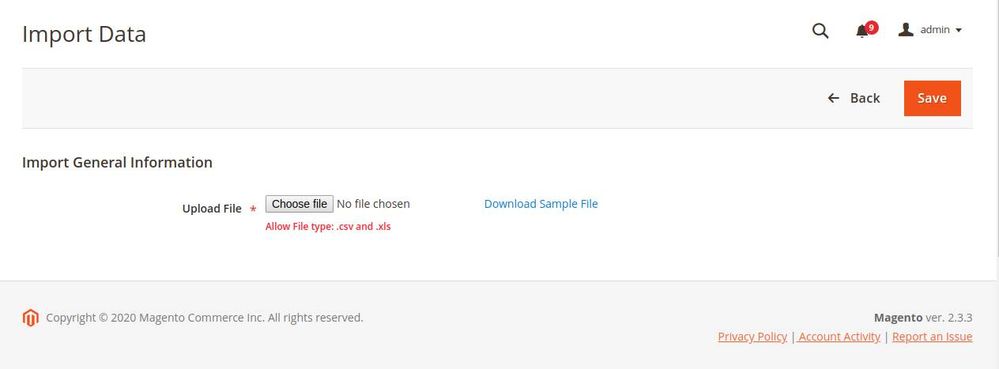
Labels:
6 REPLIES 6

- Mark as New
- Bookmark
- Subscribe
- Subscribe to RSS Feed
- Permalink
- Report Inappropriate Content
08-04-2022
11:11 PM
08-04-2022
11:11 PM
Re: How to create a file upload form ?
Hello @annq3sivn4281,
Greetings!
To create this type of form you need to follow the below steps:
1. create a registration.php file in the app/code/Milople/ProductAttachment directory.
<?php

\Magento\Framework\Component\ComponentRegistrar::register(
   \Magento\Framework\Component\ComponentRegistrar::MODULE,
   'Milople_ProductAttachment',
   __DIR__
);
2. Create a module.xml file in app/code/Milople/ProductAttachment/etc
<?xml version="1.0"?>
<config xmlns:xsi="http://www.w3.org/2001/XMLSchema-instance"
       xsi:noNamespaceSchemaLocation="urn:magento:framework:Module/etc/module.xsd">
   <module name="Milople_ProductAttachment" setup_version="1.0.0" />
</config>
3. Now, create a script to add a product attribute. create a InstallData.php in app/code/Milople/ProductAttachment/Setup
<?php
namespace Milople\ProductAttachment\Setup;

use Magento\Framework\Setup\ModuleContextInterface;
use Magento\Framework\Setup\ModuleDataSetupInterface;
use Magento\Framework\Setup\InstallDataInterface;
use Magento\Eav\Setup\EavSetupFactory;

/**
 * Class InstallData
 * @package Milople\ProductAttachment\Setup
 *
 * @codeCoverageIgnore
 */
class InstallData implements InstallDataInterface
{
    /**
     * @var EavSetupFactory
     */
    protected $_eavSetupFactory;

    public function __construct(
        EavSetupFactory $eavSetupFactory
    ) {
        $this->_eavSetupFactory = $eavSetupFactory;
    }

    /**
     * {@inheritdoc}
     * @SuppressWarnings(PHPMD.CyclomaticComplexity)
     * @SuppressWarnings(PHPMD.ExcessiveMethodLength)
     * @SuppressWarnings(PHPMD.NPathComplexity)
     */
    public function install(ModuleDataSetupInterface $setup, ModuleContextInterface $context)
    {
        $eavSetup = $this->_eavSetupFactory->create(["setup"=>$setup]);
        $eavSetup->addAttribute(
            \Magento\Catalog\Model\Product::ENTITY,
            'attachment',
            [
                'group' => 'Product Attachment',
                'type' => 'varchar',
                'label' => 'Attachment',
                'input' => 'file',
                'backend' => 'Milople\ProductAttachment\Model\Product\Attribute\Backend\File',
                'frontend' => '',
                'class' => '',
                'source' => '',
                'global' => \Magento\Eav\Model\Entity\Attribute\ScopedAttributeInterface::SCOPE_GLOBAL,
                'visible' => true,
                'required' => false,
                'user_defined' => true,
                'default' => '',
                'searchable' => false,
                'filterable' => false,
                'comparable' => false,
                'visible_on_front' => false,
                'unique' => false,
                'apply_to' => 'simple,configurable', // applicable for simple and configurable product
                'used_in_product_listing' => true
            ]
        );
    }
}
4. Now you have to create a backend model file to upload the product attachment file and save the value in the attachment attribute. So create File.php in app/code/Milople/ProductAttachment/Model/Product/Attribute/Backend
<?php
namespace Milople\ProductAttachment\Model\Product\Attribute\Backend;

use Magento\Framework\App\Filesystem\DirectoryList;
use Magento\Eav\Model\Entity\Attribute\Backend\AbstractBackend;

class File extends AbstractBackend
{
    /**
     * @var \Magento\Framework\Filesystem\Driver\File
     */
    protected $_file;

    /**
     * @var \Psr\Log\LoggerInterface
     */
    protected $_logger;

    /**
     * @var \Magento\Framework\Filesystem
     */
    protected $_filesystem;

    /**
     * @var \Magento\MediaStorage\Model\File\UploaderFactory
     */
    protected $_fileUploaderFactory;


    /**
     * Construct
     *
     * @param \Psr\Log\LoggerInterface $logger
     * @param \Magento\Framework\Filesystem $filesystem
     * @param \Magento\MediaStorage\Model\File\UploaderFactory $fileUploaderFactory
     */
    public function __construct(
        \Psr\Log\LoggerInterface $logger,
        \Magento\Framework\Filesystem $filesystem,
        \Magento\Framework\Filesystem\Driver\File $file,
        \Magento\MediaStorage\Model\File\UploaderFactory $fileUploaderFactory
    ) {
        $this->_file = $file;
        $this->_filesystem = $filesystem;
        $this->_fileUploaderFactory = $fileUploaderFactory;
        $this->_logger = $logger;
    }

    public function afterSave($object)
    {

        $path = $this->_filesystem->getDirectoryRead(
            DirectoryList::MEDIA
        )->getAbsolutePath(
            'catalog/product/attachment/'
        );
        $delete = $object->getData($this->getAttribute()->getName() . '_delete');

        if ($delete) {
            $fileName = $object->getData($this->getAttribute()->getName());
            $object->setData($this->getAttribute()->getName(), '');
            $this->getAttribute()->getEntity()->saveAttribute($object, $this->getAttribute()->getName());
            if ($this->_file->is Exists($path.$fileName))  {
                $this->_file->deleteFile($path.$fileName);
            }

        }

        if (empty($_FILES['product']['tmp_name'][$this->getAttribute()->getName()])) {
            return $this;
        }

        try {
            /** @var $uploader \Magento\MediaStorage\Model\File\Uploader */
            $uploader = $this->_fileUpzloaderFactory->create(['fileId' => 'product['.$this->getAttribute()->getName().']']);
            $uploader->setAllowRenameFiles(true);
            $result = $uploader->save($path);
            $object->setData($this->getAttribute()->getName(), $result['file']);
            $this->getAttribute()->getEntity()->saveAttribute($object, $this->getAttribute()->getName());
        } catch (\Exception $e) {
            if ($e->getCode() != \Magento\MediaStorage\Model\File\Uploader::TMP_NAME_EMPTY) {
                $this->_logger->critical($e);
            }
        }

        return $this;
    }

}
5. Then, display the product attachment link and delete the checkbox after saving the product in the admin form. For that create a di.xml in app/code/Milople/ProductAttachment/etc/adminhtml
<?xml version="1.0"?>
<config xmlns:xsi="http://www.w3.org/2001/XMLSchema-instance" xsi:noNamespaceSchemaLocation="urn:magento:framework:ObjectManager/etc/config.xsd">
   <virtualType name="Magento\Catalog\Ui\DataProvider\Product\Form\Modifier\Pool" type="Magento\Ui\DataProvider\Modifier\Pool">
       <arguments>
           <argument name="modifiers" xsi:type="array">
               <item name="attachment" xsi:type="array">
                   <item name="class" xsi:type="string">Milople\ProductAttachment\Ui\DataProvider\Product\Form\Modifier\File</item>
                   <item name="sortOrder" xsi:type="number">1000</item>
               </item>
           </argument>
       </arguments>
   </virtualType>
</config>
6. Then, create File.php in app/code/Milople/ProductAttachment/Ui/DataProvider/Product/Form/Modifier
<?php
namespace Milople\ProductAttachment\Ui\DataProvider\Product\Form\Modifier;

use Magento\Framework\Stdlib\ArrayManager;
use Magento\Store\Model\StoreManagerInterface;
use Magento\Catalog\Ui\DataProvider\Product\Form\Modifier\AbstractModifier;

class File extends AbstractModifier
{
    /**
     * @var ArrayManager
     */
    protected $arrayManager;

    /**
     * @var StoreManagerInterface
     */
    protected $storeManager;

    /**
     * @param ArrayManager $arrayManager
     * @param StoreManagerInterface $storeManager
     */
    public function __construct(
        ArrayManager $arrayManager,
        StoreManagerInterface $storeManager
    ) {
        $this->arrayManager = $arrayManager;
        $this->storeManager = $storeManager;
    }

    public function modifyMeta(array $meta)
    {
        $fieldCode = 'attachment';
        $elementPath = $this->arrayManager->findPath($fieldCode, $meta, null, 'children');
        $containerPath = $this->arrayManager->findPath(static::CONTAINER_PREFIX . $fieldCode, $meta, null, 'children');

        if (!$elementPath) {
            return $meta;
        }

        $mediaUrl =  $this->storeManager->getStore()
            ->getBaseUrl(\Magento\Framework\UrlInterface::URL_TYPE_MEDIA);

        $meta = $this->arrayManager->merge(
            $containerPath,
            $meta,
            [
                'children'  => [
                    $fieldCode => [
                        'arguments' => [
                            'data' => [
                                'config' => [
                                    'elementTmpl'   => 'Milople_ProductAttachment/elements/file',
                                    'media_url' => $mediaUrl
                                ],
                            ],
                        ],
                    ]
                ]
            ]
        );
        return $meta;
    }

    public function modifyData(array $data)
    {
        return $data;
    }
}
7. create file.html in app/code/Milople/ProductAttachment/view/adminhtml/web/template/elements
<input class="admin__control-file" type="file" data-bind="
    hasFocus: focused,
    attr: {
        name: inputName,
        placeholder: placeholder,
        'aria-describedby': noticeId,
        id: uid,
        disabled: disabled,
        form: formId
    }"
/>
<!-- ko if: $parent.source.data.product[code] -->
<span>
    <a attr="href: media_url+'catalog/product/attachment/'+$parent.source.data.product[code]" text="$parent.source.data.product[code]" target="_blank"></a>
    <label attr="for: uid+'_delete'">
        <input type="checkbox" attr="name: 'product['+code + '_delete]', id: uid+'_delete', form: formId">
        <span data-bind="i18n:'Delete'"></span>
    </label>
</span>
<!-- /ko -->
And you’re done! Save details and check on the front end. If you come across any errors or need some clarification feel free to drop me a line. Happy to help – Always.
Solved? Click KUDOS and accept it as a solution.
Thank

- Mark as New
- Bookmark
- Subscribe
- Subscribe to RSS Feed
- Permalink
- Report Inappropriate Content
08-09-2022
04:10 AM
08-09-2022
04:10 AM
Re: How to create a file upload form ?
The solution worked for me thanks to the community and the members for the solution. PaybyPlateMa Login
- Mark as New
- Bookmark
- Subscribe
- Subscribe to RSS Feed
- Permalink
- Report Inappropriate Content
08-09-2022
04:27 AM
08-09-2022
04:27 AM
Re: How to create a file upload form ?
Hi @lennyburkdc1c9,
Greetings!
Please click KUDOS or accept it as a solution so that it can help others too.
Thanks

- Mark as New
- Bookmark
- Subscribe
- Subscribe to RSS Feed
- Permalink
- Report Inappropriate Content
10-13-2024
01:12 AM
- Mark as New
- Bookmark
- Subscribe
- Subscribe to RSS Feed
- Permalink
- Report Inappropriate Content
10-13-2024
01:21 AM
- Mark as New
- Bookmark
- Subscribe
- Subscribe to RSS Feed
- Permalink
- Report Inappropriate Content
10-13-2024
01:22 AM
© 2019 Magento, Inc. All rights reserved.